For AV integrators, IT teams and consultants
Teams Rooms and Zoom Rooms designs, BOMs and proposals in minutes, not days.
Survey a meeting room, classroom, signage or video wall. RoomSpec sizes the screens, picks Microsoft Teams Rooms and Zoom Rooms certified kit from every major brand, and builds the bill of materials, drawings and client proposal for you.
Founding members get early access and a locked-in price. Watch the 30-second demo
Example output
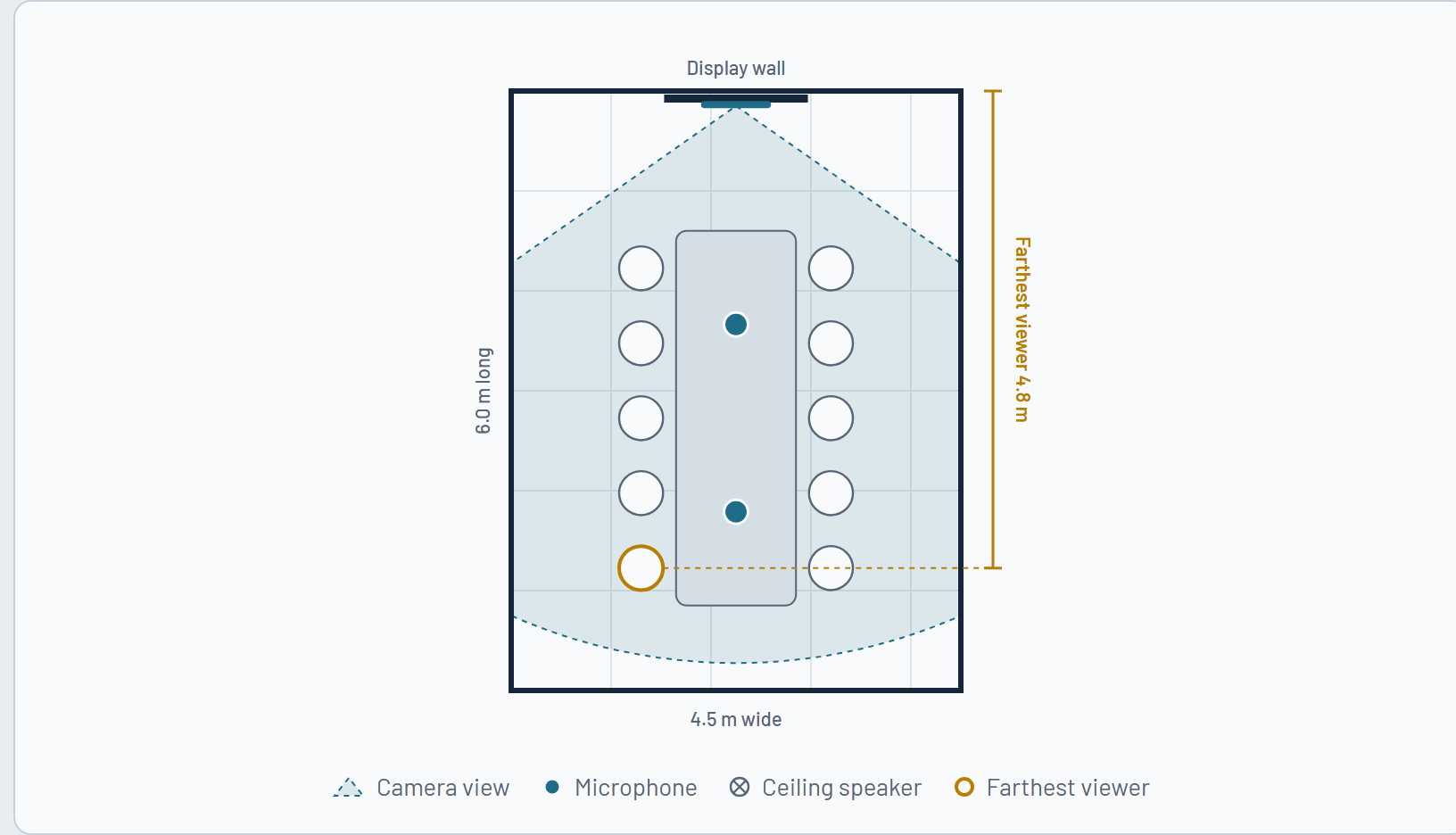
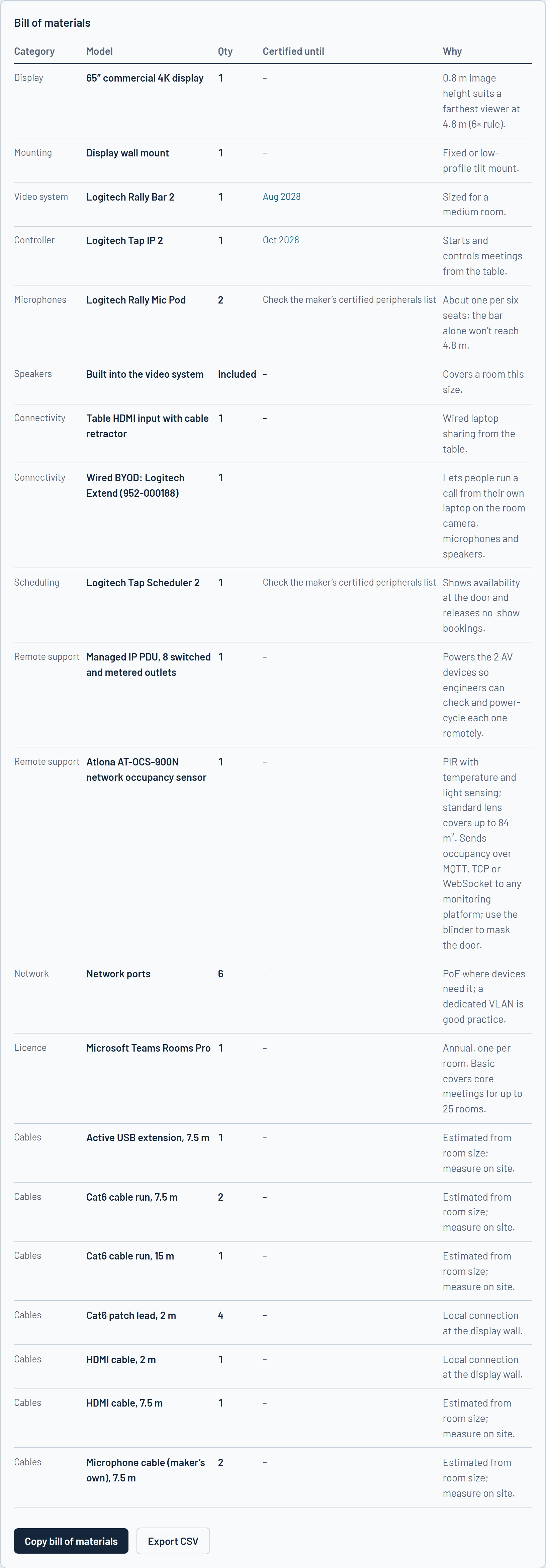
Medium room for 10 people
Certified until Aug 2028
How it works
1
Survey the space
Room size, seats, walls, ceiling and windows. Snap a photo and RoomSpec reads the room for you.
2
Get a certified design
Screens sized by viewing distance, mics and speakers placed, and kit chosen from current certified lists, with a plan drawing.
3
Send the proposal
A branded PDF with the kit shown in the client’s own room, your quote, and a sign-off page.
Built on industry best practice
AVIXA guidance at the core of every design
RoomSpec follows the design principles of AVIXA, the audiovisual industry association: screens sized for the farthest seat, sightlines and camera coverage checked, acoustics measured and treated, lighting, accessibility and the network planned in.
A built-in best practices guide walks your team and your clients through each step, from the needs assessment to testing and handover.
See the outputs
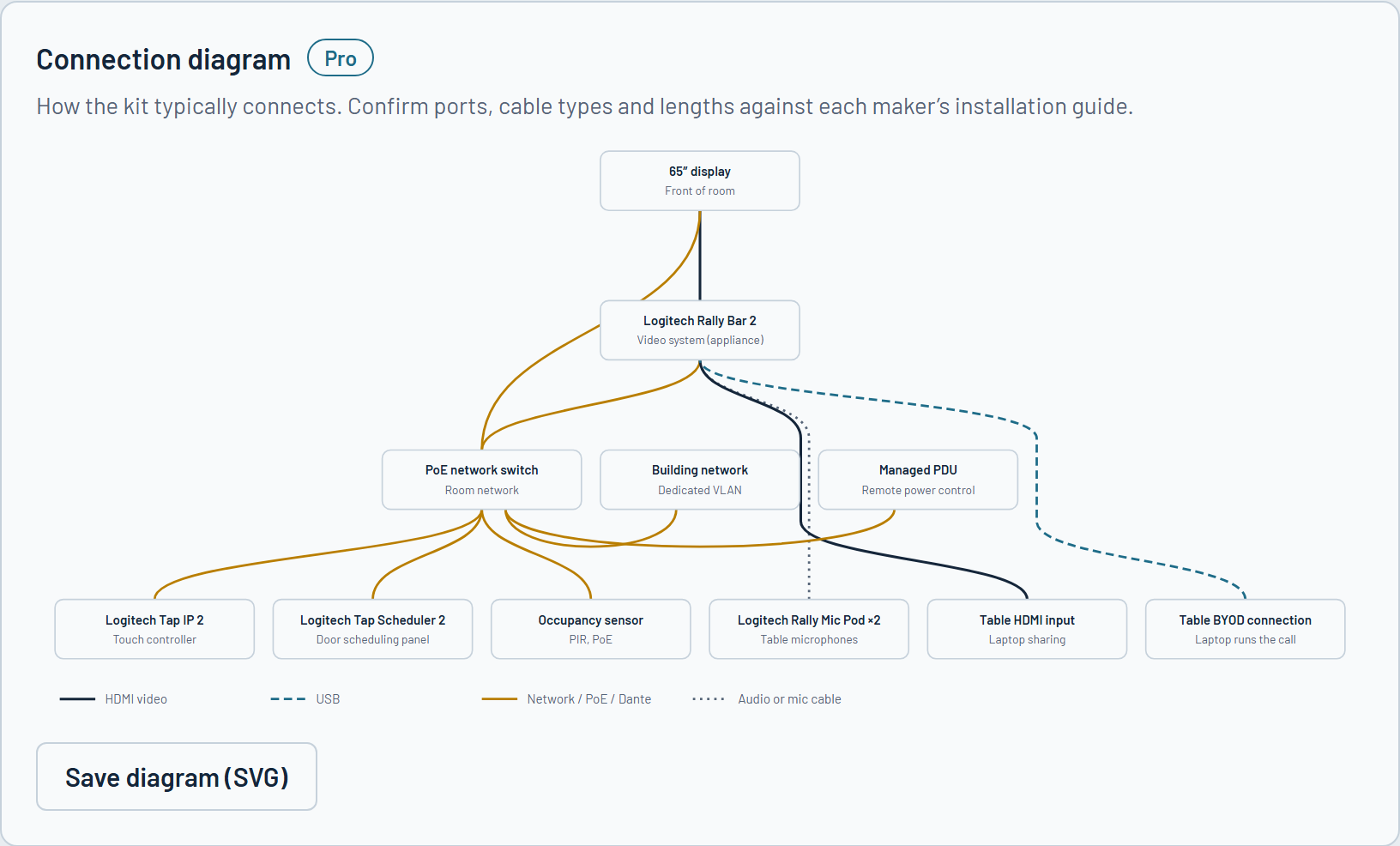
A sample design for a medium Teams Room for 10 people, exactly as RoomSpec produced it. Nothing has been retouched.
Every space you’re asked to quote
One tool and one bill of materials for the whole building, from huddle rooms to lecture theatres.
What you get
Certified, brand-neutral kit
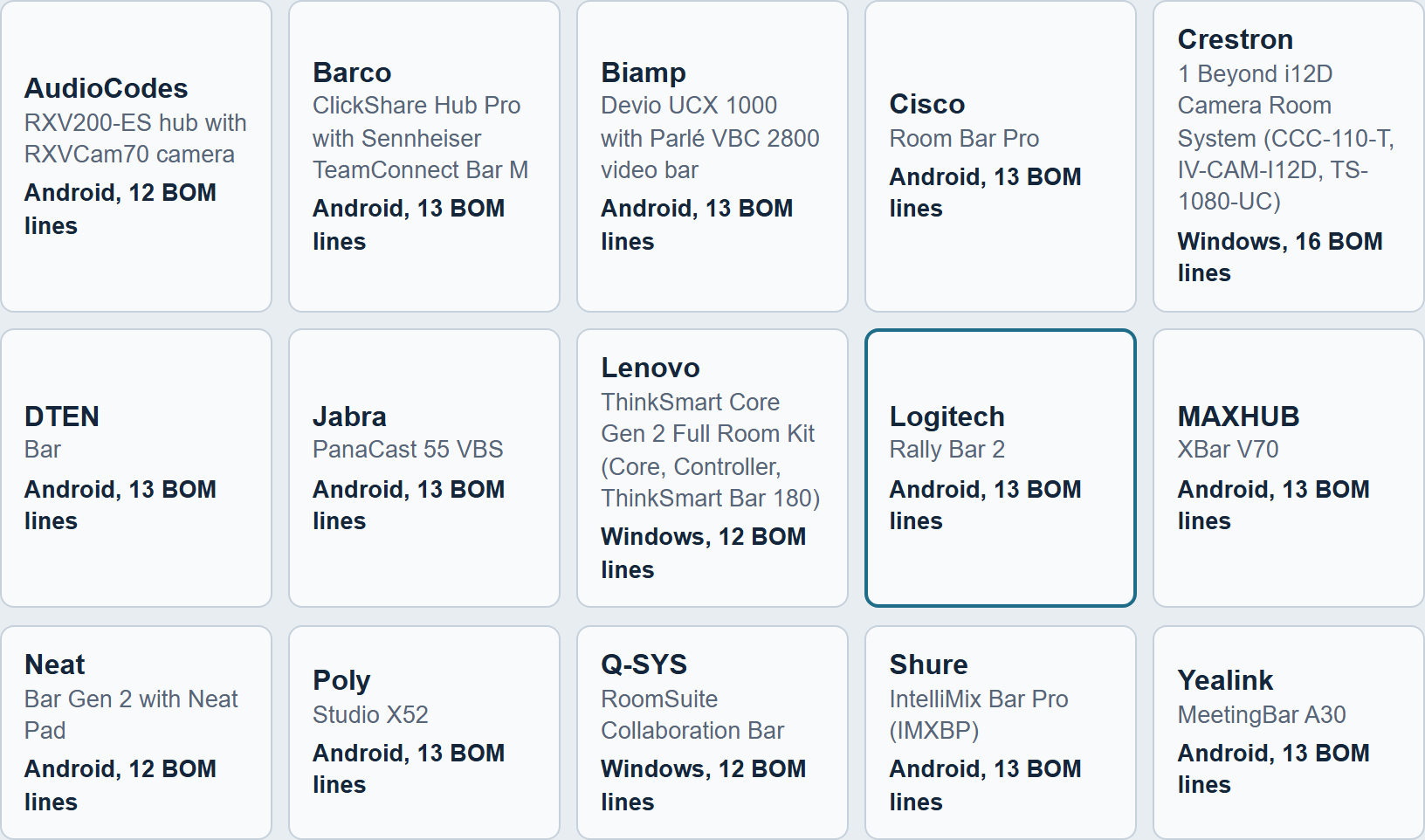
Video systems and controllers are checked against Microsoft’s Teams Rooms and Zoom Rooms certified lists, including the date each one’s certification ends. 15 Teams Rooms brands, 13 Zoom Rooms brands, and no paid placement.
Android, Windows and BYOD
Teams Rooms on Android or Windows, Zoom Rooms appliances or PCs, and wired or wireless BYOD so people can run calls from their own laptop.
See it in the room
Tap the wall’s corners on a photo and the screens and video bar appear to scale.
Diagrams, cables and racks
Connection diagram, labelled cable schedule and rack elevation, ready for the install team.
Acoustics, measured on your phone
Clap once and get the room’s reverberation time, plus how much treatment it needs.
Power, PoE and network
Per-model PoE classes, switch sizing, sockets and firewall notes for the client’s IT team.
Ready for remote support
Managed PDU, occupancy sensors, cloud portals and an asset register for handover.
Quotes from your price list
Import your own trade prices, set margin and labour, and add the quote to the proposal.
Your company standards
Lock approved brands, displays and mounts so every design matches how you work.
Best practices guide
A step-by-step guide to good room design, based on AVIXA guidance, built into the tool.
Built for your region
Metric or imperial, local power, accessibility standards, currency and paper size.
Who it’s for
AV integrators and MSPs
Turn a site visit into a proposal the same day, and spend designer time on the rooms that need it.
Corporate IT and workplace teams
Plan rooms to your own standard, check what’s certified, and brief suppliers with a clear spec.
AV consultants
A neutral first design and documentation pack in minutes, ready for you to refine.
Where the data comes from
Checked, dated and open about its sources
- Video systems and controllers are checked against Microsoft’s Teams Rooms certified hardware and Zoom’s Zoom Rooms certified hardware lists. Device lists last checked October 2026, and rechecked every month.
- 196 certified devices tracked across 15 Teams Rooms brands and 13 Zoom Rooms brands, with certification end dates where Microsoft and Zoom publish them (estimates are marked).
- Screens sized so the image height suits the farthest seat; reverberation time worked out with the Sabine formula; PoE budgets use the standard IEEE 802.3af, at and bt class allowances.
- Room design follows AVIXA’s Conference Room Design Guide and industry best practice. Rules of thumb are labelled as such in every design.
Free tools
Quick answers for meeting rooms, classrooms and AV spaces. Free, brand-neutral and no sign-up.
Pricing
Founding members lock in their price for as long as they subscribe. We’re setting that price with the people who’ll use RoomSpec, so tell us what you think is fair in a few quick questions.
Free
€0
Designs, plan drawings and a basic bill of materials for every space type.
Pro
Founding price
Set with our first users
Everything in Free, plus proposals, quotes, photo mock-ups, diagrams, cables, acoustics, installation packs and projects.
Team
Founding price
Set with our first users
Pro for your whole team, with shared standards, price lists, saved projects and client review.
Questions
Is RoomSpec tied to a brand?
No. It compares every certified brand side by side and nobody pays to be recommended.
Is it based on industry standards?
Yes. Designs follow AVIXA’s published design guidance and established industry rules for display sizing, audio coverage and acoustics.
Does it replace a designer?
It gives you a sound first design fast. Complex spaces are flagged for a designer to review before ordering.
Where does the product data come from?
Microsoft’s and Zoom’s certified device lists and makers’ datasheets, checked regularly.
Do I need to install anything?
No. It runs in your browser on a laptop in the office or your phone on site.
Is my pricing private?
Yes. Your price lists and margins are private to your account and never shown to clients.
What happens to my data?
The free tools run entirely in your browser, and nothing you enter is sent to us. There are no tracking cookies. See the privacy policy for the details.
When can I start?
Join the waitlist and we’ll be in touch about founding-member access.
Be one of the first to use it
Founding members get early access, a locked-in price and a say in what we build next, starting with the price. After you join, a few optional questions take about three minutes.